Fast Answer
To reduce interruptions at work, stop resisting them and change the defaults that let them in. Resisting each ping spends willpower all day. This 30-day install removes one input per week instead: first the biggest recurring interruption, then notifications and workspace defaults, then one space or slot that restores. Most founders can run the input audit in an afternoon. Here is how to build it and what to expect in the first month.
Key Takeaways
- To reduce interruptions at work, change defaults. Resisting each one spends willpower all day.
- Start with an input audit so you remove the real source, not the assumed one.
- Week 1 removes the biggest recurring interruption. Week 2 makes focus the default. Week 3 adds somewhere to recover.
- Notifications off by default is the single highest-leverage setting for most founders.
- At two weeks, one interruption you used to fight is gone. At six, focus is the default.
Why Changing Defaults Works When Willpower Does Not
It is 10:05. Slack has a red badge, Gmail is open in a tab, WhatsApp Web is pinging in the corner, and your phone has lit up twice on the desk. Your ops lead has sent a voice note that starts with “just a quick one”. When you finally count, there are 37 notification sources across your devices. Each is individually reasonable. Together they decide your morning.
So you resist. You close one tab, then another. You turn the phone face down. By 11:00 you have resisted fifteen times and written nothing. Resistance is a cost you pay on every ping, and you pay it with the same attention you meant to spend on the decision only you can make.
Research on interrupted work points the same way. In a study led by Gloria Mark at the University of California, Irvine, people who were interrupted compensated by working faster, but reported more stress, frustration and time pressure. The work still got done. The cost moved into the person doing it.
The alternative is to change the defaults so the right action is the easy one. That is an Environment problem, not a character problem.
The Mechanism It Corrects
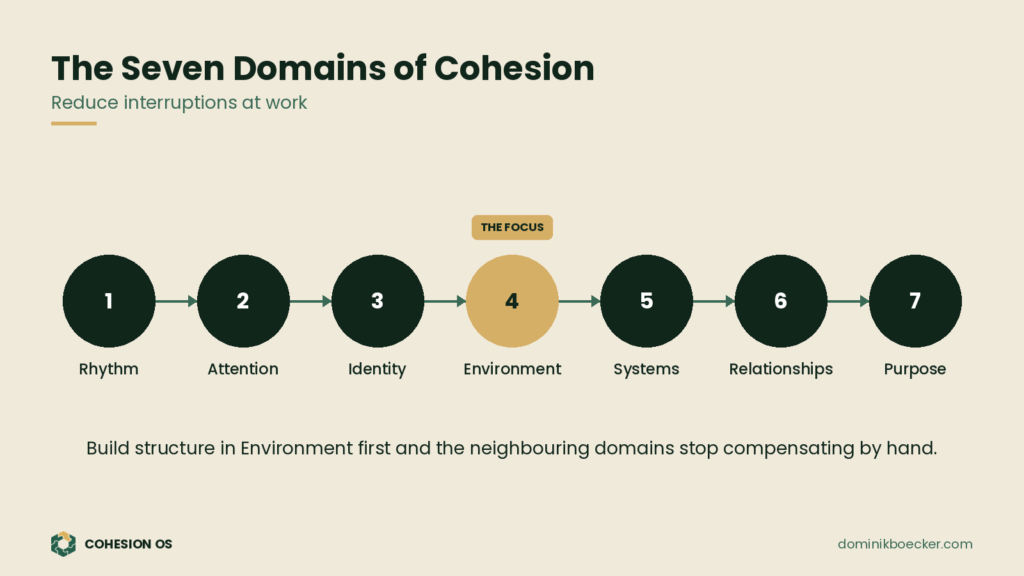
Environment is the fourth of the seven domains in Cohesion OS: Rhythm, Attention, Identity, Environment, Systems, Relationships and Purpose. It covers physical and digital defaults: tools, workspace, notification settings. When it holds, the right action is the easy one and there is a single source of truth. When it fractures, every channel reaches you, every tool competes for attention, and focus has to be forced by hand.
More tools do not create organisation. They create more places for fragmentation to hide. Each new app arrives with its own badge, its own inbox and its own default of “notify everything”. Nobody chose that setup. It accumulated.
So the correction is to remove inputs, not manage them better. A default you change once keeps working on the days you are tired, travelling or under pressure. Willpower does not.
Founder Cohesion Assessment
Is Environment really where your company is fracturing?
The 4-minute assessment scores all seven domains and shows which one is pulling the rest apart, so your first correction goes where it will hold.
Take the AssessmentFree. Takes about four minutes.
How to Reduce Interruptions at Work: Step by Step
- Week 1: run the input audit. List every source that can interrupt you: apps, devices, channels, people. For each, note how often it fires, who it serves, and whether to keep, batch or remove it. Allow about 45 minutes, and do it from your actual settings screens, not from memory.
- Remove the single biggest recurring interruption. Not five. One. Turn off the notification, leave the channel or hand it to someone who should own it.
- Tell the people it affects. A short note: what changed, when you will check, and where to reach you for a real emergency.
- Week 2: make focus the default. Notifications off on every device, except calls from a short list. Set up one workspace for deep work: a clear desk, a second browser profile with no Slack or email, or a specific room.
- Week 3: create one space or slot that restores. A walk at the same time each day, a spot away from screens, or a proper lunch. It should actually restore you, and it should recur.
- Write the fallback. On a heavy day, protect one hour with everything off. Decide now which hour, so you do not negotiate it on the day.
- Friday report. Two lines: what held, what broke. Adjust the setting, not your resolve.
Copy-Paste Template
INPUT AUDIT
Source | Fires per day | Who it serves | Keep / Batch / Remove

WEEK 1: remove this one:
Told (names):
Emergency route:

WEEK 2: defaults
Notifications on for (short list only):
Deep work workspace:
Opens at / closes at:

WEEK 3: restore
Where:
When (day and time):

FALLBACK (heavy day):
FRIDAY REPORT: what held / what broke
Worked Example
One founder of a 15-person agency listed 37 sources and found that 11 produced most of her interruptions. The biggest was a client WhatsApp group that pinged all day. In week one she moved it to a twice-daily check and told the clients her response times. In week two, notifications went off except for calls from three people. In week three, she took a 20-minute walk without her phone at 15:00.
By week six she was finishing her planning in the morning, and her team had stopped escalating small questions because the answer no longer arrived within a minute. What made it hold was that the defaults were changed once, not defended daily.
Common Mistakes When Trying to Reduce Interruptions at Work
- Fixing the loudest interruption instead of the most frequent. The audit exists to stop you guessing.
- Relying on discipline to ignore notifications that are still on. If it can reach you, it will.
- Removing inputs without telling anyone. Silence reads as unreliability. A clear rule reads as structure.
- Doing everything in week one. One change a week is what makes the changes stick.
- Treating recovery as a luxury. The week 3 slot is part of the install, not a reward for finishing it.
- Re-enabling a notification “just in case”. That is how the old default quietly returns.
How to Know It Is Working
At 2 weeks: the biggest interruption is gone and you are no longer fighting it. You notice its absence more than you notice the effort.
At 6 weeks: your workspace and settings support focus by default, a short list of people can reach you in a real emergency, and your team brings fewer small questions because they have learned when you are reachable.
Environment Fragmentation Domain
Go deeper on Environment: Scorecard and Playbook Bundle
The Environment Fragmentation Scorecard shows exactly where your tools, workspace and defaults are leaking attention. The Playbook gives you the step-by-step corrections, in order.
Get the Environment BundleFAQ
How do I reduce interruptions at work without seeming unresponsive?
Tell people what changed and give them an emergency route. Most people accept a clear rule far more readily than silence. A line such as “I check Slack at 11:00 and 16:00; for anything urgent, call me” sets expectations once. Responsiveness becomes predictable instead of constant, which is what clients and teams actually want from a founder.
Which notifications should I keep?
Keep calls from a short list of people and anything tied to a genuine emergency, such as a payment failure or a system outage. Everything else can be batched into fixed check times. If you are unsure about a source, turn it off for a week and see whether anything breaks. Usually nothing does.
What if I work in a client-facing role?
Set client-hour windows, share your response times and use a single channel for urgent items. Your team can usually handle more than you think, especially once they know when you are reachable. Client-facing work needs reliable responses, not instant ones, and a stated rhythm often reads as more professional than an always-on founder.
Why does my phone matter so much?
Because it carries every channel at once: Slack, email, WhatsApp, calls and the apps you forgot you installed. Putting it out of reach during a deep work block removes the most common interruption in a single step. It is the clearest example of changing a default instead of relying on willpower to ignore it.
Next Step
Before you install another tool, check it is the right one. Take the Founder Cohesion Assessment to see which of the seven domains needs structure first, so this system goes where it will hold.
Willpower resists a ping. A default prevents it.
Free Cohesion OS Program
Get the free 9-module founder program.
Step 1 is a 4-minute assessment. It scores all seven domains, shows where your company is fracturing first, and starts the program there.
Start with the AssessmentFree. One stabilising move a week for 8 weeks.
About the Author
Dominik Boecker is the creator of Cohesion OS. He helps founder-led companies identify the fracture lines that create overload, dependency, and operational fragmentation, then install the systems that restore cohesion across rhythm, attention, identity, environment, systems, relationships, and purpose.